coding but time traveling and teleporting and different dimensions
disclaimer:
this is intended for my team members, and is rather concise
the code is located here (teamillusioncmit/frc2026)
git isn’t too hard! and its really good for working on code as a team. getting straight into it:
when you make a few changes that you want to save, make a commit. it’s basically a snapshot of your code at that point, and we can go back to it if necessary. you can also push it to github so that everyone can get the latest commits.
to make a commit, you’ll need a message as well. i’ve been using conventional commits, which are basically:
type: messagefor example, a real commit from me:
feat(drive): deadband joystick inputswhat if we want to work on different things at the same time though? say i wanted to add an arm subsystem, and you wanted to edit the driving system. we would both make branches: essentially alternate timelines. the main timeline (branch) would remain intact, while we both can make commits in our own branches.
then, when we’re ready (maybe not at the same time!), we can merge our branches back into main. however, when working at the same time, conflicts will definitely arise in which we make changes to the same files. for example:
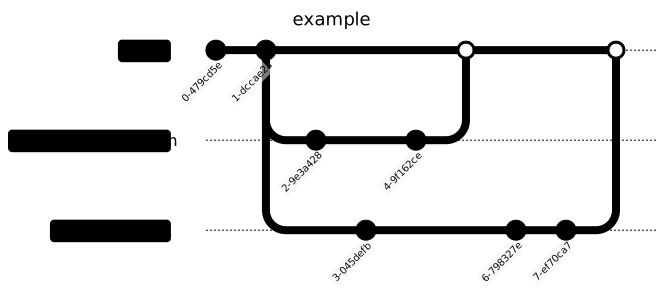
we need to collapse these into one continuous stream. for that, we can rebase, which will merge the commit history in chronological order.
important vocab
commit - a snapshot in time
branch - an alternate timeline
merging - combining branches
conflicts - inconsistencies between branches
rebasing - combining the commits from two branches into one continuous stream